Product direction, workflow design, AI-assisted implementation and evidence review.
Video analysis & editorial review
Video Insight Bundler
Find the moment. Check the evidence.
Video Insight Bundler turns a recording into a set of linked review views: a transcript, time-based graphs and explanations of what each signal can help a reviewer investigate. The result is a focused starting point for deciding which passages deserve a closer listen.
Working prototype · Recorded case study · Selected analysis evidence
Project video · 3:22
Video Insight Bundler: from recording to review
A software walkthrough of sidebar navigation, graph cards, pacing, topic progression and acoustic evidence, narrated with Brian HQ.
Click the picture to play. Full screen and volume are available in the controls.
Open the video file ↗Read the narration transcript
This transcript follows the spoken narration. The figures and written evidence below provide additional visual context.
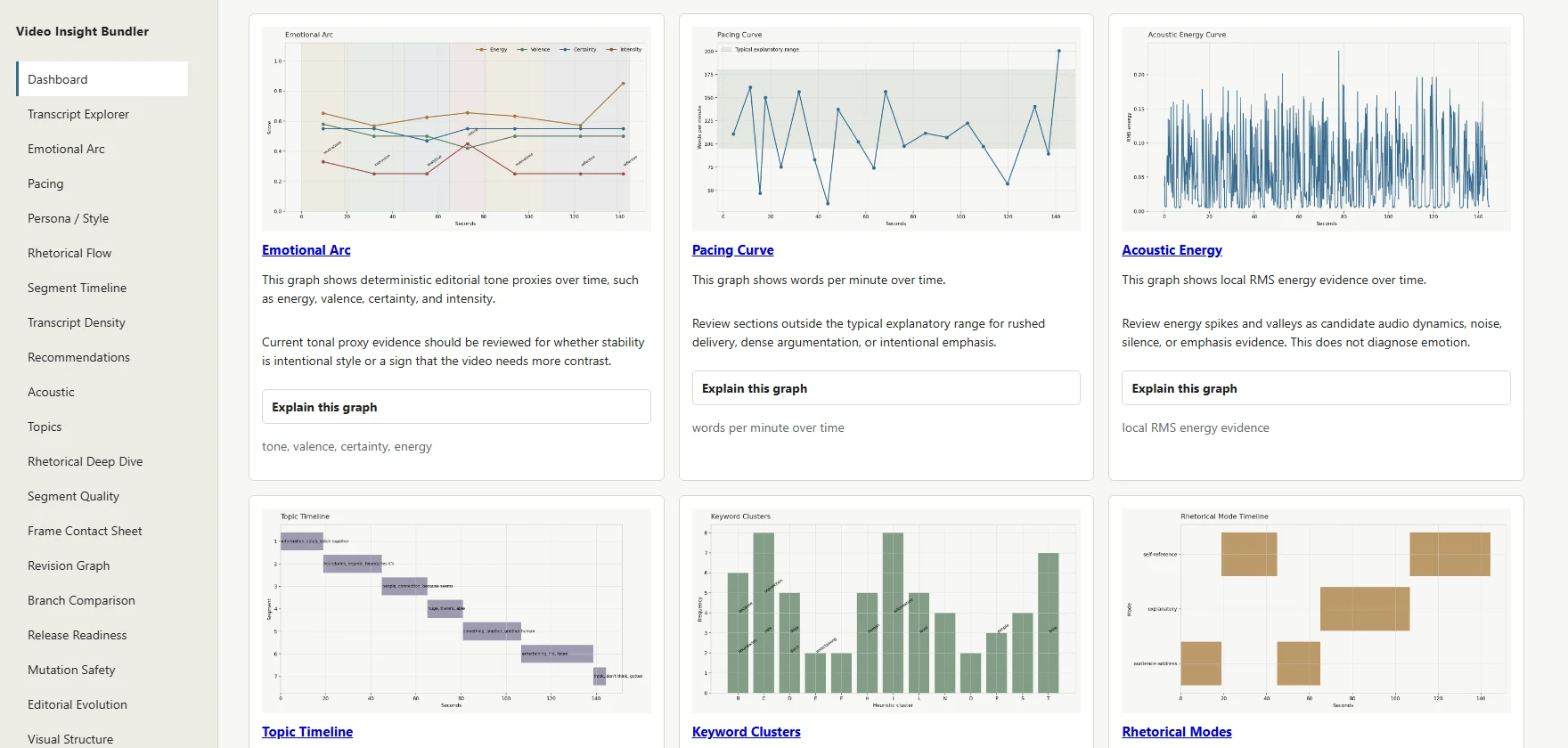
Here is Video Insight Bundler. The sidebar links to the transcript, pacing, topics, and other review pages. Across the dashboard, boxed graph cards bring several views of a recording together. Each card opens a closer look at the graph and its guidance. Let's follow one excerpt through the program.
For this example, we're using a two minute, twenty five second excerpt from a reflection on artificial intelligence and human connection. We'll compare the speaker's words with the patterns in the saved analysis. The dashboard brings together the transcript and a collection of graphs. Here, the saved analysis contains two hundred sixty words and seven topic segments.
Let's follow three views from the restored primary graphs: pacing, topic progression, and acoustic energy. The pacing curve makes changes in delivery visible. Around two minutes into the excerpt, one transcript interval averages about fifty seven words per minute. This is where the speaker asks why somebody should listen to him.
That gives a reviewer a specific passage to check for a pause or emphasis. The sharp final rise also deserves context: it comes from a very short interval, so its boundary can strongly affect the rate. The topic timeline gives us another route through the same recording. We begin with tools that stitch information together.
The discussion then moves into connection with A I, compares it with the connection people have with cats and dogs, and eventually turns back to the speaker's own value as a human communicator. The labels come from local term analysis. Some are more useful than others. Reading them beside the transcript helps us decide whether a transition is clear or needs
a closer listen. Acoustic energy adds a measurement of the sound itself. The overall level here is fairly steady, with brief peaks and quieter passages. We can use those changes to locate a moment in the recording, then listen to understand what happened. A peak measures energy.
Its meaning depends on the voice, the recording, and the surrounding words. Each primary graph also opens an explanation of what it measures and how to read it. That makes the analysis easier to inspect and discuss. The emotional arc is another available view, using editorial tone proxies. Those cues need human interpretation.
The practical question remains: should this moment be preserved, reviewed, or documented? The result is a more focused starting point for editorial review: find a passage, compare the signals, and check the original recording. This working project shows how local analysis can organize evidence and make a creative
decision easier to explain. The reviewer makes the final call.
Download English captions (WebVTT)145 ssource excerpt used in this case study260words in the extracted transcript7topic segments in this saved analysis3:22narrated software walkthrough
A local analysis pipeline and linked HTML review bundle for recorded video.
Specific passages can be located and compared through transcript, pacing, topic and acoustic views.
A recorded software walkthrough, actual interface captures and selected graphs from one verified excerpt.
Start here
Follow one recording through the review process.
The film begins with the program itself, then follows a 1:15–3:40 excerpt from a reflection on AI and human connection.
- See the workspaceExplore sidebar navigation and linked graph cards in the recorded interface.
- Compare six viewsUse pacing, topic progression, acoustic energy and other graph views to locate candidate review moments.
- Check the sourceReturn to the transcript and recording before deciding what to preserve or change.
01 / The difficult question
How do you find the passages worth reviewing?
A recording can contain a useful argument, a deliberate pause and an unclear transition within the same few minutes. Watching it repeatedly is time-consuming, while a summary alone can hide the delivery and timing that matter to an editor.
The project asks whether several inspectable measurements, kept close to the transcript and source time, can help a reviewer find a useful starting point and explain an editorial decision.
02 / Brian's contribution
Connect analysis to a practical review workflow.
Brian shaped the product requirements, directed its AI-assisted implementation and organized the interface around linked evidence rather than a single opaque assessment. His review work included selecting the source excerpt, rerunning analysis, checking graph values and refining how the findings were explained.
The case study brings that workflow into a short software demonstration: show the program, locate a passage, compare the signals and keep the human decision explicit.
03 / How the system works
01Select & transcribe
Choose a source interval and retain its timestamped transcript.
→02Measure & organize
Calculate pacing, transcript terms and local acoustic features.
→03Inspect the bundle
Navigate linked graphs, transcript views and reading guidance.
→04Review the source
Listen to the passage and decide whether to preserve, revise or document it.
The graphs narrow the search and make the evidence visible. Editorial meaning comes from the recording and the reviewer’s judgment.
04 / The review workspace
Several views of the same recording, within reach.
The sidebar links to transcript, pacing, topic, acoustic and other review pages. Boxed graph cards provide a visual overview, and graph detail pages explain what is measured, how to read it and what to preserve.
The demonstrated pacing curve identifies transcript intervals with different speaking rates. The topic timeline arranges locally extracted terms across segments. Acoustic energy provides a separate view of measured sound level over time.
A concrete passage to investigate
Around two minutes into the excerpt, one transcript interval averages approximately 57 words per minute. The speaker is asking why somebody should listen to him: a specific place to check for a pause or emphasis.
A second route through the argument
The transcript moves from tools that stitch information together, through connection with AI and comparisons with pets, to the speaker’s value as a human communicator. The topic view helps locate those passages for review.
Selected analysis evidence
Six ways into one excerpt.
These are the original graph images from the demonstrated run. Graph time starts at zero for the selected 145-second clip.
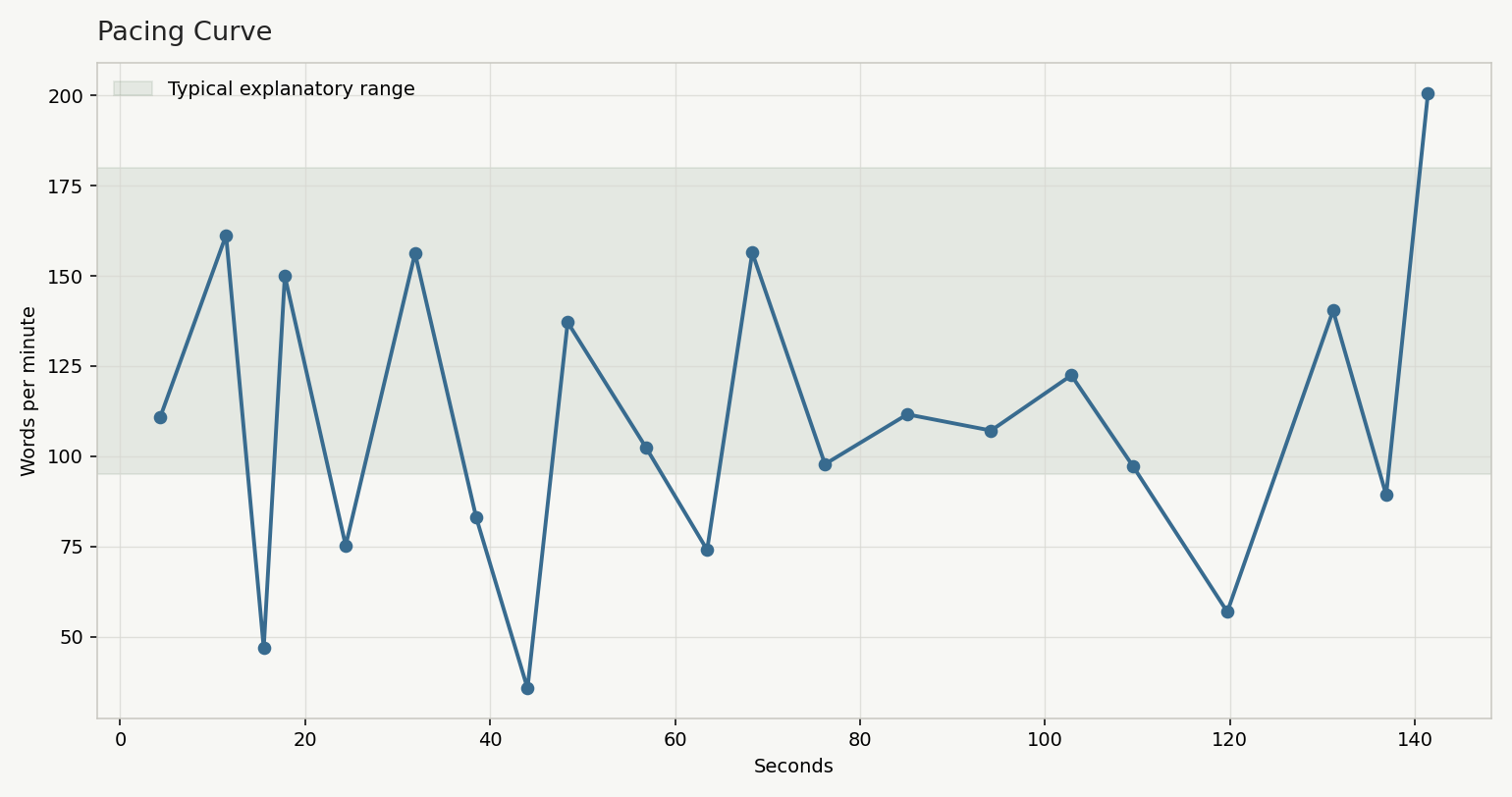
The slow passage around clip time 2:00 averages approximately 57 WPM. The final rise comes from a short interval whose boundaries strongly affect its rate.
Open full-size view ↗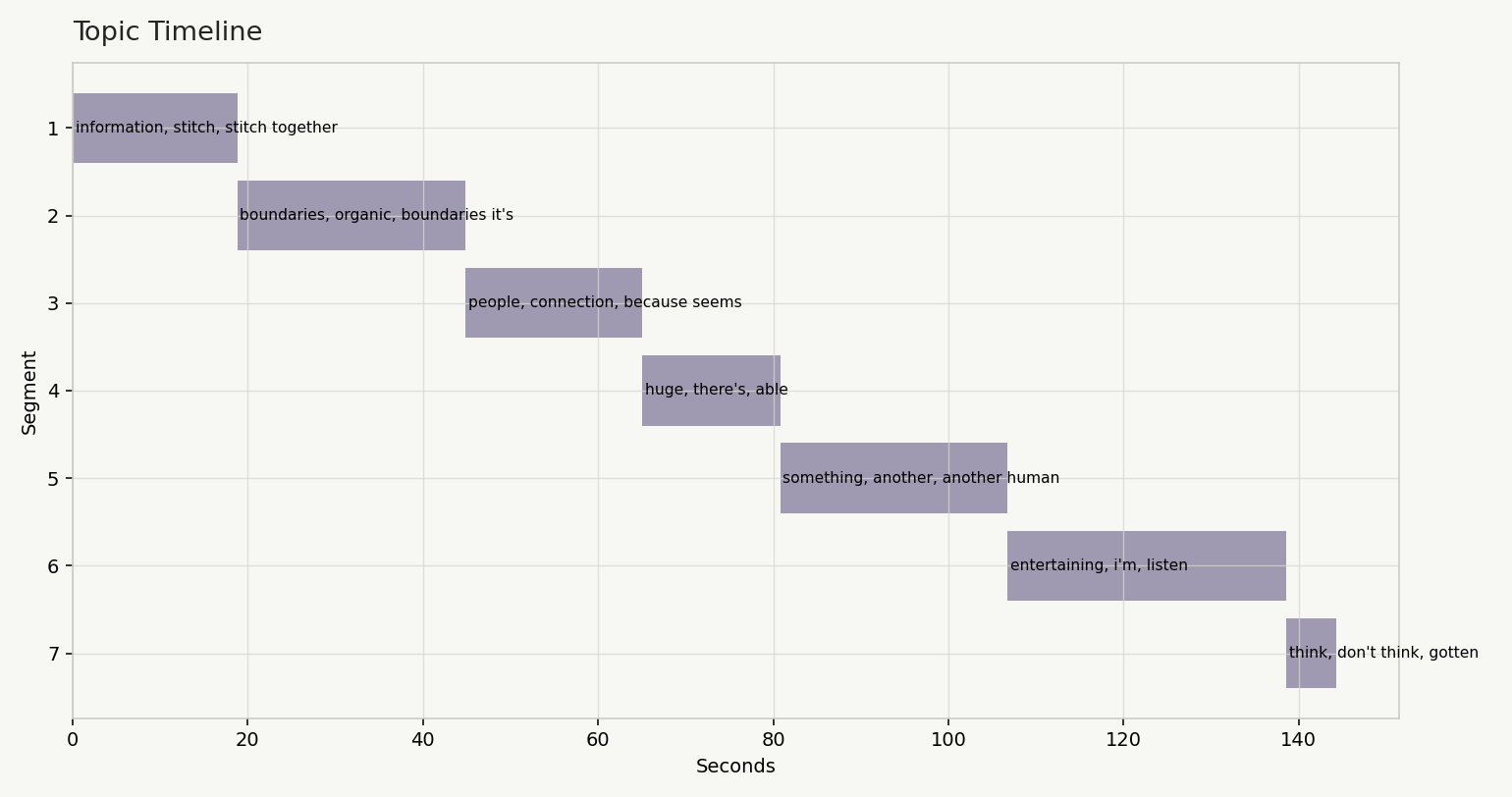
Labels come from local TF-IDF term analysis. They are signposts to compare with the transcript, rather than a complete interpretation of the argument.
Open full-size view ↗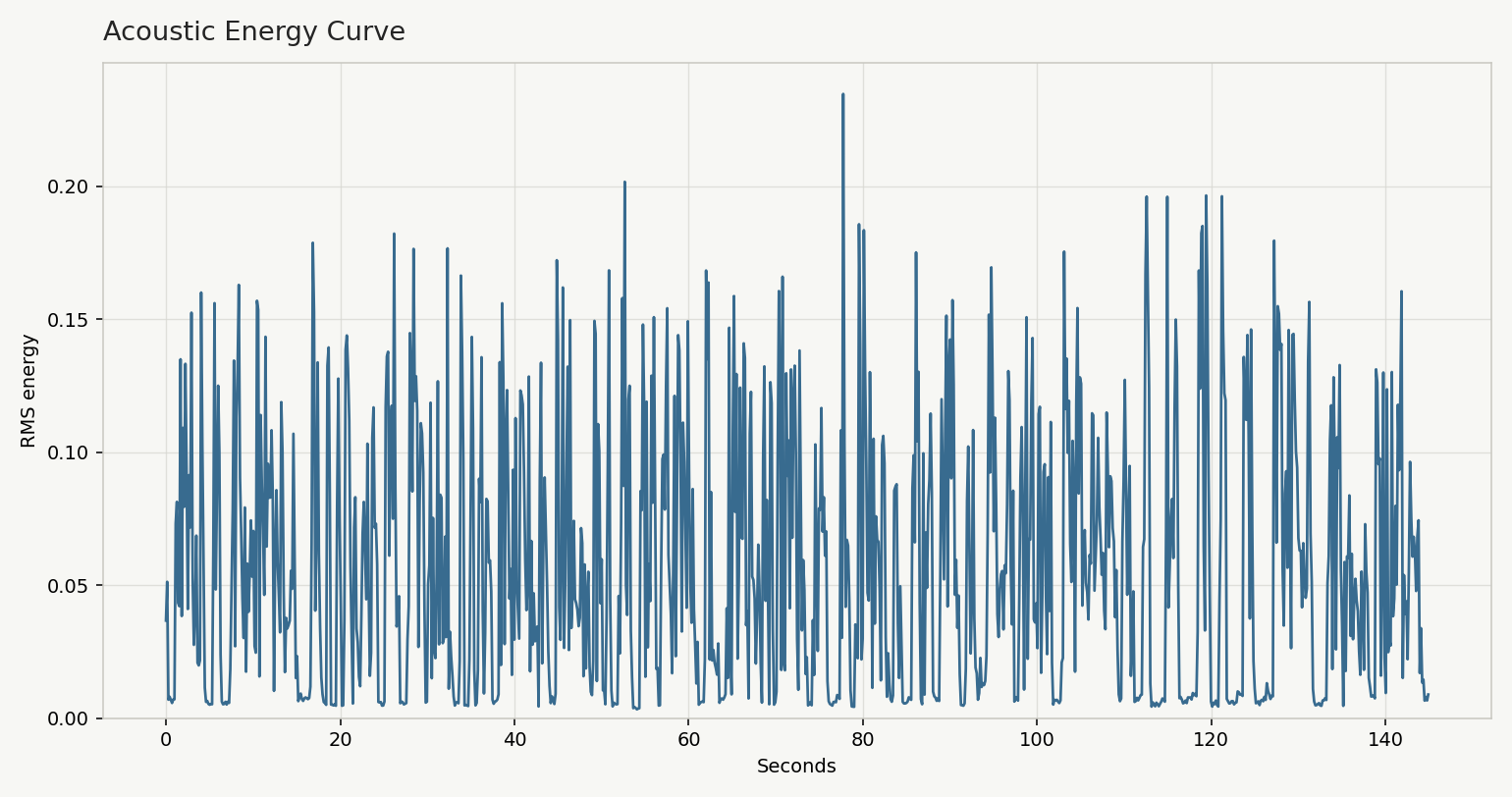
Changes in local sound level help locate moments to replay. Their meaning depends on the voice, recording conditions and surrounding words.
Open full-size view ↗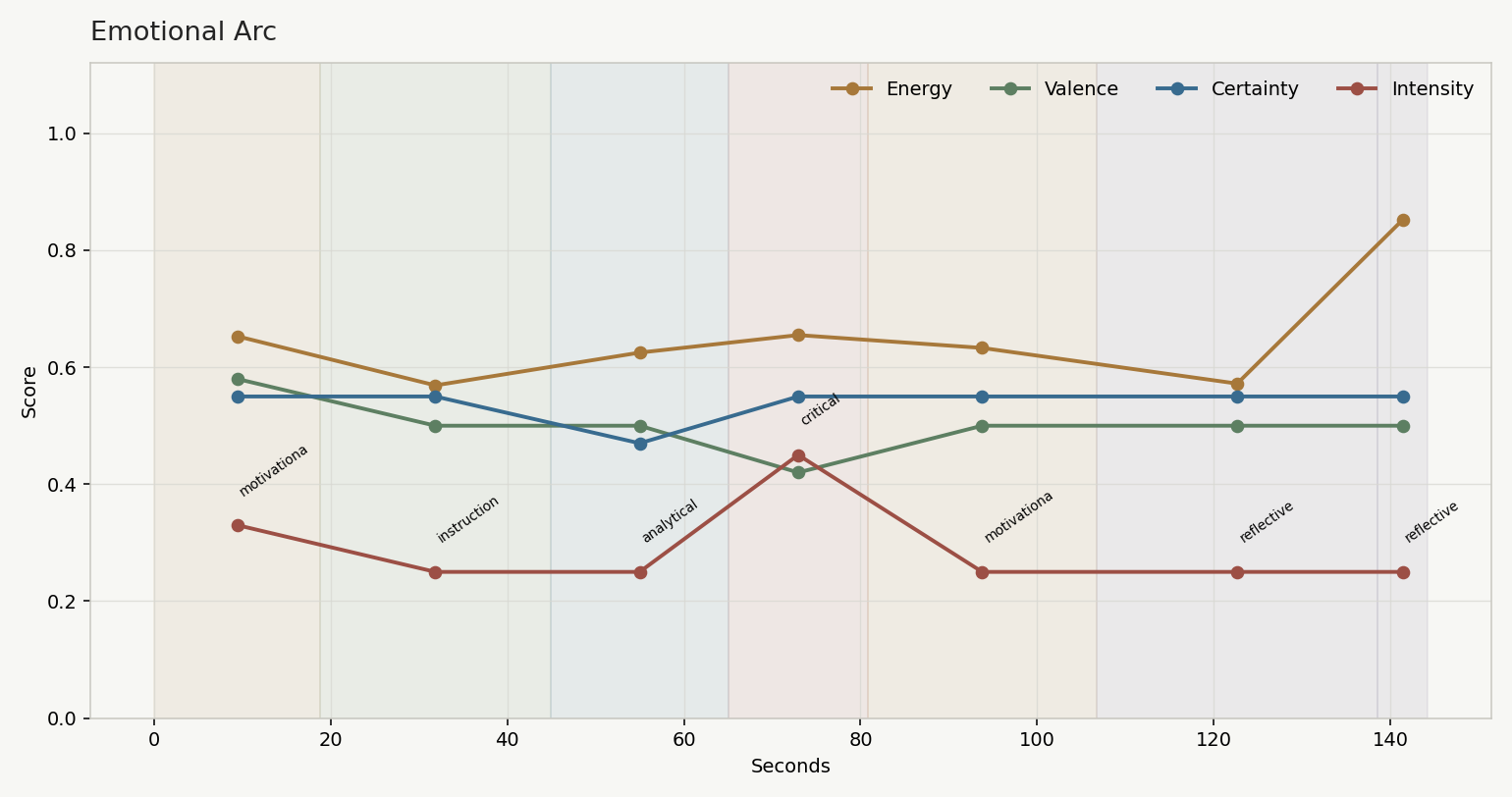
These deterministic proxies are prompts for listening. They do not measure or validate the speaker’s emotional state.
Open full-size view ↗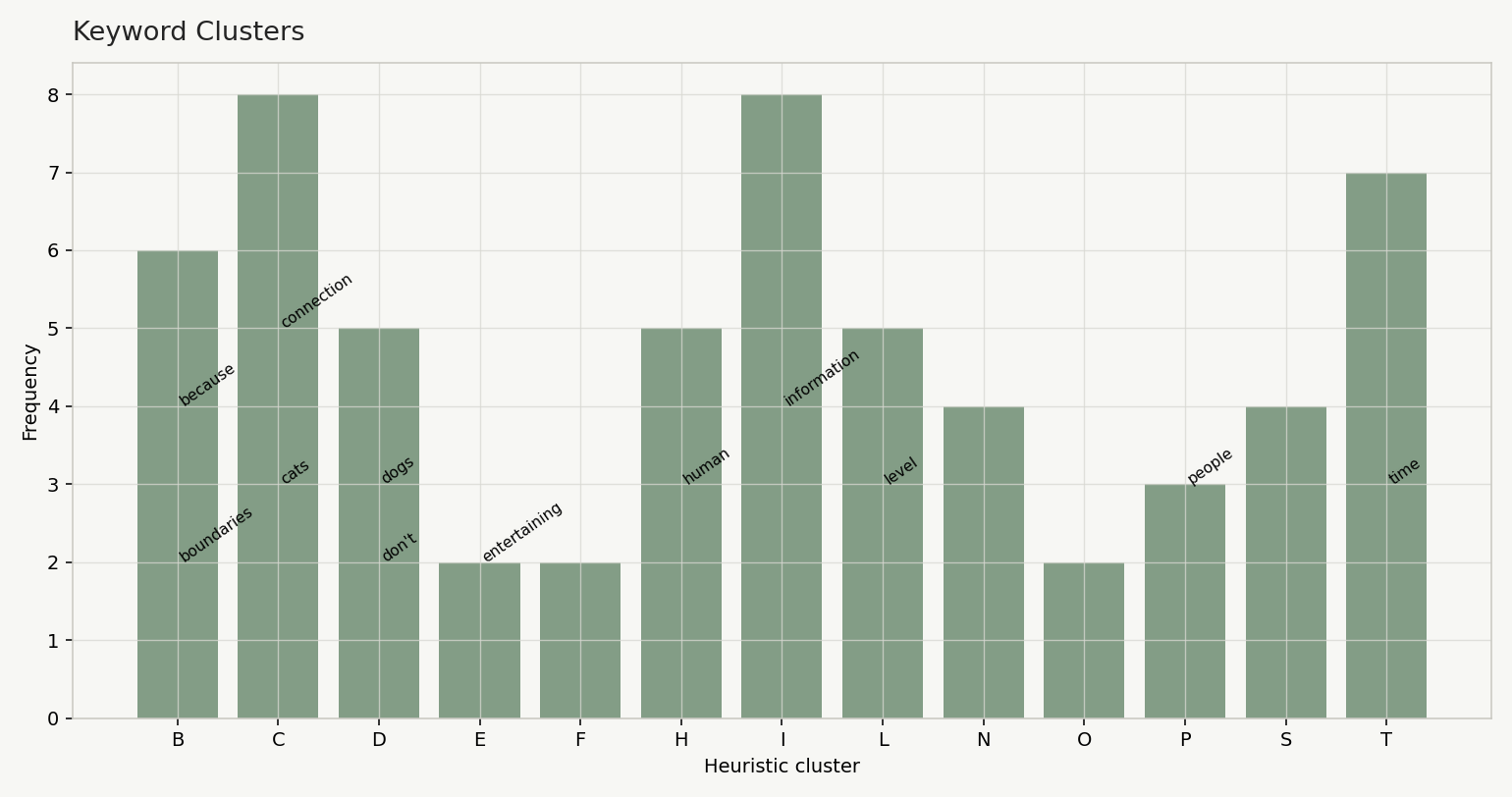
The clusters organize recurring transcript vocabulary for inspection; they are not a validated semantic interpretation.
Open full-size view ↗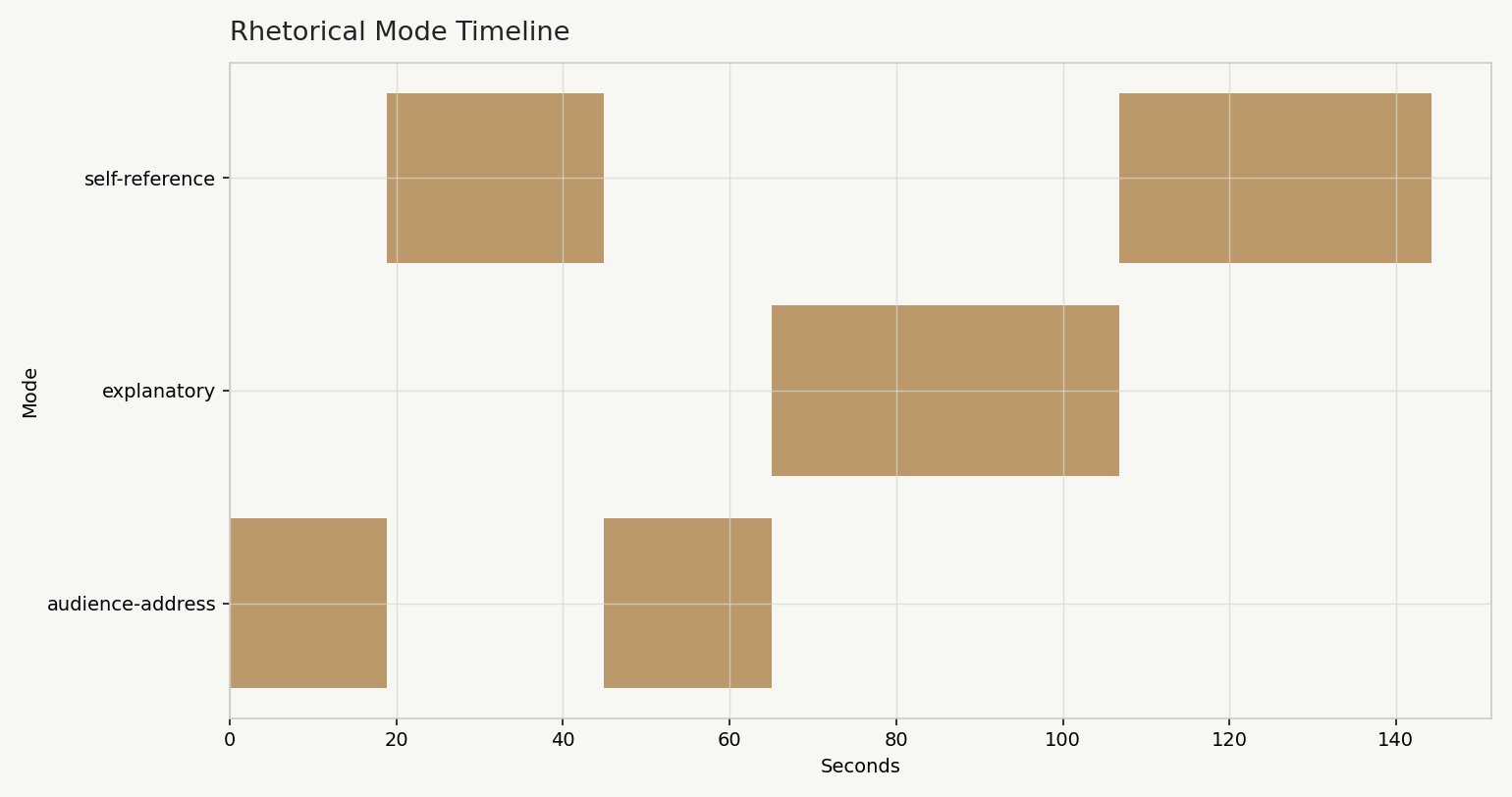
The labels are heuristic navigation cues. Check them against the transcript and recording; they are not a validated discourse classification.
Open full-size view ↗Technologies & skills
Implementation toolkit.
- Python
- FFmpeg
- Timestamped transcription
- Local TF-IDF analysis
- Acoustic feature extraction
- Data visualization
- HTML review workflows
- Evidence-based evaluation
Scope & limitations
A review aid with an explicit evidence boundary.
This page presents a working prototype and one checked excerpt, rather than an independent evaluation of editorial quality or a general production-readiness claim. The implementation and full analysis bundle are not published here.
Pacing depends on transcript segmentation. Topic terms reflect surface vocabulary. Acoustic energy measures sound level, while the emotional-arc view uses editorial tone proxies. These signals require interpretation alongside the original recording.
The software does not apply editorial changes automatically. A reviewer decides whether a pattern is intentional, useful or worth revising. The walkthrough uses Brian HQ synthetic narration generated with ElevenLabs.
Inspect the evidence
Watch the workflow and inspect its example.
Useful when
Your team needs to turn recordings or other unstructured material into reviewable signals, linked evidence and a practical human decision workflow.
Explore a focused technical investigation →